Unit Controls
When a unit has been selected on the Map View, a control widget will appear at the bottom center of the screen. The Unit Controls widget will give you some information about the unit, the terrain it is on and then some buttons corresponding to actions that the unit can take from the Unit Menu, Combat Menu, or the Work Menu respectively. Fig. 61 shows a Workers that has been selected.
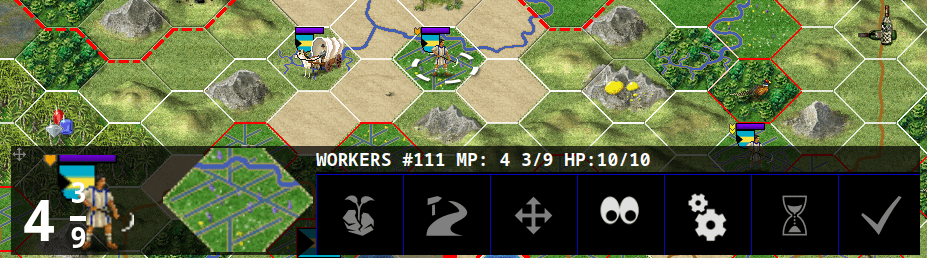
Fig. 61 Unit Controls Widget
You can see that the Workers is selected because it has a white selection ring around its base. Looking at the dialog, in the header, you can see that this unit is ID # 111, has 4 3/9 Move Points (MPs), and 10 of 10 Hit Points (HPs).
From left to right you can see an image of the unit with MPs overlaid, the terrain it is on with infrastructure improvements shown, and then the actions that this unit can take. In this example the actions available are: Plant to Forest/River, Build Road, Go to Tile, Sentry, Auto Worker, Wait, and Done.
Depending on the type of unit selected, the available actions will change, but the other information will remain the same. If you rename a unit (from the Unit Menu), the name will appear in quotes after the Unit ID value.
If the unit selected is not in your field of vision on the map, then you can click on the icon for the unit on the left side and the game map will center on the unit for you. As with other widgets in Freeciv21, you can click+drag the widget to move it by using the plus symbol in the upper left corner.
If you scroll your mouse wheel over the unit icon on the left side of the widget, the game will cycle through idle or sentried units of the same unit type.